
The Secret GBP Checklist We Use to Get Clients at #1 in Google
When someone uses Google to search for a service or store, the first thing that pulls up on most devices is the Google Business “Three Pack” containing three Google Business Profiles (GBPs).
These profiles collect between 42%-44% of clicks of any given search. Therefore, you really need to focus on getting your brand to show up in the top three.
We have a checklist we use for our clients at Bluestem Media to help them get more visibility in this three-pack.
Here it is!
Core Business Information
This is actually one of the most important steps most people miss. These are simple, but we take over many accounts where these are set up incorrectly.
- Categories matter more than people think – Your business category will drive what keywords Google allows you to show up for. VERY IMPORTANT. I helped one client recently where the settings were not set up properly. Within a week of changing the settings, it moved the average position by over 10 positions across all tracked keywords. Make sure you add your primary category of the main service you provide and sub-categories for any other services you provide.
- Operating hours on GBP, website, AND landing pages need to match – Talk to your web designer if you intend to adjust or change operating hours. Your hours need to be consistent across all platforms. Inconsistency hurts trust signals with Google. This includes seasonal hours!
Photos
A couple of things to focus on with photos on your profile.
- Turn on the geotagging feature in your phone and upload geotagged photos – You can enable the location settings on your iPhone to record the exact coordinates where you took a photo. If you upload photos to your Google Business Profile with the location included in the metadata, this can be a trust signal/ranking factor. If you say you do business in a particular area, and Google sees a geotagged photo in this area, this is a ranking factor!
- Make sure your logo is properly sized – We see many improperly sized photos in Google Business Profiles, and they look terrible. Make sure it’s sized to the space and displays properly.
- Add real photos of people and jobs, NOT stock photos or AI-generated images – The temptation is to use stock photos in your GBP because it’s easy and quick. Do not do this. Instead, work on taking photos of projects, your storefront, your installers, and your staff – and upload these instead. You build way more trust with your customers, and the Google algorithm can tell if you are using a stock photo or an AI-generated photo.
Reviews
Customers can review your services on the profile, and these reviews are critical for showing up in the Google Three Pack. A couple of things we coach on this:
- Respond to every review – Google analyzes whether the owner responds to reviews and even how long it takes to respond. Make sure you have settings enabled to get a message when a customer leaves a review. Respond back within 24-48 hours with a genuine response. This is a ranking signal AND a trust builder. We offer this as a service to our clients to answer on their behalf!
- Link from website to reviews – This is a less orthodox method, but we like to link to reviews on the GBP if we mention the review on a website page. This cross-pollination allows for Google to build context between your website content and the customers who are leaving you reviews.
- Build a system to get reviews – The companies that dominate visibility in the Google Three Pack build systems to gather reviews from customers. This is critical to understand. If you rely on the goodwill of customers to leave reviews and don’t have a system to gather reviews on every customer touchpoint, you and your staff will get lazy, and it will be 4-5 months between getting reviews. Have a way to follow up with happy customers to get a review.
Products, Services & Posts
This is the area you have the most control over and can update the most frequently.
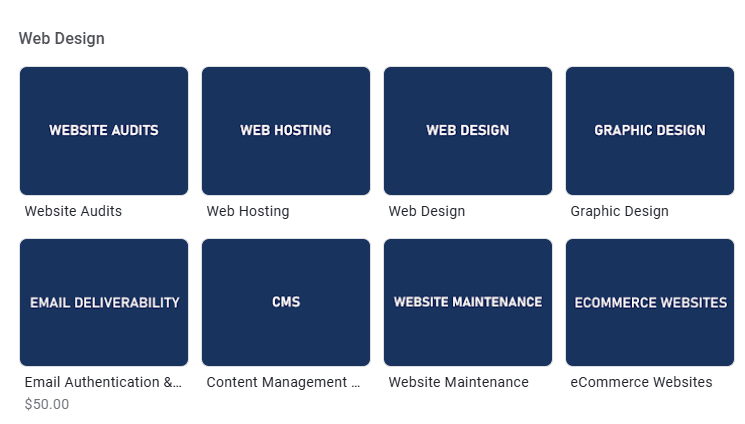
- Use the Products area – Even if you are only a service-based business, you should be using the Products area in the GBP. We “reframe” services as products, even on our own profile. For example, we list Web Design Services as a “product” and have a description and image for this.
- Use the Services area with accurate pricing – If you are willing to publish pricing online, this is a great way to boost your profile. Having logically structured services, along with rich descriptions and accurate pricing (which should also match the website). Pricing helps with conversions.

- Plan regular GBP Posts for ongoing engagement – We regularly post to our clients’ Google Business Profiles. There are two reasons for this: (a) engagement – you want customers to engage with your content and offers on a daily basis (b) topical relevance – we like to discuss the core services and offerings at least once every 6 months on the profile, as this is the window of visibility on the post. Once a post is older than 6 months, it falls out of the relevant “window” in the GBP and is no longer visible. We want to keep core topics visible at all times.
Profile Attributes & Links
- Add all relevant attributes – Make sure you add every attribute that is applicable to your business. A big one for our recent client is that they were able to do online estimates through a new piece of software, and they could therefore add the “Offers online estimates” attribute in Google. A great boost and addition in the SERP.
- Use the booking links area – If you have a booking engine, make sure to link this to the Booking area in your GBP. We also use Contact pages for this as well.
- Social media links – Often missing on accounts we take over. This helps you paint the picture to Google of all the digital properties you own and map the footprint of your business.
Strategy Hacks & Quick Wins for Google Business Profiles
There are a couple of things we do to help boost SEO on both the GBP and the website.
- Track GBP ranking checks as part of monthly reporting – We use BrightLocal to track where our clients’ positions are, down to the street or neighborhood. When we are reviewing results with our clients, this report is a favorite!
- Linking from website to GBP and vice versa – Depending on your SEO strategy, this can be a helpful signal to Google to help build authority for both entities. You can run links from your Contact page, relevant location pages, and more.
- Schema markup reinforces GBP data – We use Schema Markup to create consistency between what Google sees on your website and what they see on your Google Business Profile. This takes some technical know-how, so it’s worth consulting with a web developer. We can help you with this.
- Block your own IP in GA4 – We block our own IP addresses when working on our clients’ websites, so we get accurate data. Very important for reporting analytics, especially when trying to attribute GBP clicks.
- Profile completeness is a competitive advantage – Most competitors have half-filled GBP profiles. Being thorough is an advantage that Google will reward. Don’t skip any fields in the setup process and be thoughtful about each step.
If you work on all these items, you will have a huge advantage over your local competition. Planning is easy, execution is hard. If you want a little help working on your profile and getting long-term leads, reach out to me personally. We consult on strategy and execution of lead generation techniques for home services businesses that don’t have everything figured out but are prepared to grow.

Isaac Wiinanen
Isaac is an SEO Strategist & Web Project Lead for Bluestem Media. Focused on local SEO, Google Business Profile optimization, and StoryBrand marketing.